Release notes · Week of 13–19 October 2026
Email watching, adding AI employees and early access to own hardware
Your AI employee watches your Gmail or Google Workspace inbox for the emails you choose and brings each to your chat within minutes. You can add AI employees any time, and sales teams can add a colleague to many Pipedrive deals at once. In early access, AI employees can run on your own hardware. What you teach stays in use until something newer replaces it.
- 5 new
- 8 improved
- 13 fixes
Updates marked Early access are switched on for selected companies.
Highlights
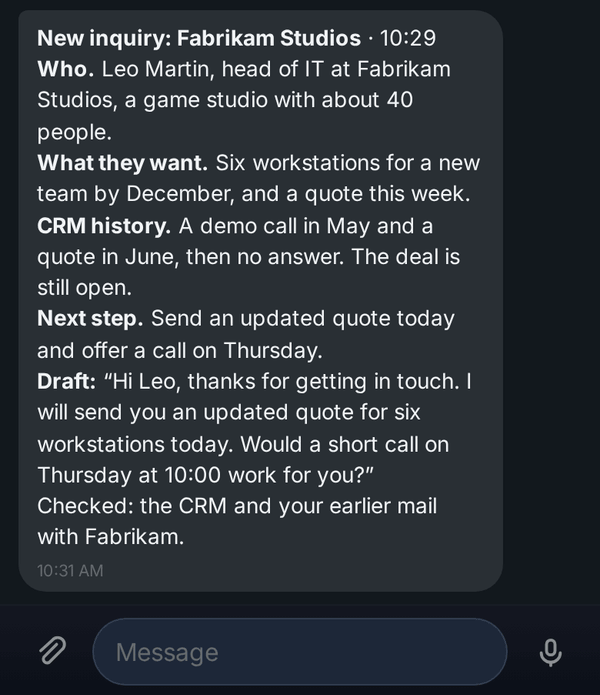
Your AI employee watches for the emails you choose
Each matching email reaches your chat within a couple of minutes, already summarized, drafted or turned into a task.
For managers, sales teams and support teams
Read more: Your AI employee watches for the emails you choose
Add AI employees yourself whenever your team needs one
You add an AI employee from the team list at any time, pick a role, and hear before anything is created if the plan's limit is reached.
For business owners and admins
Read more: Add AI employees yourself whenever your team needs one
Run an AI employee on your own hardware
A few clicks put the AI employee on your computer, and it answers with the AI you chose while that computer is online.
For admins and business owners

New and improved
AI employees & teams
- Add AI employees yourself whenever your team needs one
You add an AI employee from the team list at any time, pick a role, and hear before anything is created if the plan's limit is reached.
- Create AI employees from your team list and finish drafts
Your team list has a button to create an AI employee at any time, also on a phone, and a draft can be switched on from its details.
- An automatic check compares replies with what your AI employee did
A reply check that cannot finish tries again 2 minutes and then 15 minutes later, up to three tries in all, and a later note is added just like an early one.
Chats & mobile
- The topic list of a long chat loads much faster Early access
In our tests the topic list loads about five times faster, and you see how many of your 100 topics you have used before you add one.
- Come back to an old topic and pick up where you left off Early access
Your AI employee brings back the topic's facts with the day it learned each one, and answers from the newest.
- Each topic tab shows its own unread count Early access
Reading one topic clears only its count, and the other topic tabs keep theirs until you open them.
- Sort your chats with colleagues into your own topics Early access
You sort a colleague's messages into your own topics, and a notification opens the message right in its topic.
Email & calendar
- Your AI employee watches for the emails you choose
Each matching email reaches your chat within a couple of minutes, already summarized, drafted or turned into a task.
CRM & sales
- Add a colleague to many Pipedrive deals in one request
You ask once, and your AI employee adds the colleague to the deals you name, skipping the deals they already follow.
Approvals & agreements
- Your yes in a chat topic covers only what was asked there Early access
A yes or no in a topic of your AI employee's chat decides only that topic's requests, and the main tab still decides all of them.
Knowledge & files
- What you teach your AI employee stays in use
Your AI employee reads your standing instructions first when it writes an answer in the chat, and what it knows stays in use until something newer replaces it.
Your own AI & hardware
- VEP on your own hardware keeps itself up to date
The VEP software on your computer installs new versions by itself once running work is done, and goes back to the previous version if one fails to start.
- Run an AI employee on your own hardware Early access
A few clicks put the AI employee on your computer, and it answers with the AI you chose while that computer is online.
Fixes
- Cards for your own hardware say what to do next
A newly connected computer shows that it is waiting to start and the one command that starts it, and only AIs that can chat are offered for it.
- Answers from your own hardware show at zero cloud cost Early access
Answers from your own computer show at zero cost, and only answers that run in VEP's cloud count toward the daily spending limit.
- Your AI employee knows how much of a long PDF it has read
Your AI employee is told how many pages of a very long PDF it read, and that the remaining pages were not read.
- Fewer false alarms when your AI team reports on its tasks Early access
The reply check reads each task's state and history, so a report that matches is backed by the task, and one that does not gets a note saying what the task shows.
- When a scheduled task can't run, the people who can fix it are told
The people who manage a scheduled task's AI account get a notice in VEP, and the task's chat keeps a short line about what happened.
- Setup guide for your own hardware matches what you see
The setup guide names each real button, and the setup steps in VEP show both install commands on separate lines and copy each in one click.
- Manage your own hardware from Safari on iPhone and iPad
The list of your own computers keeps showing their state in Safari on iPhone and iPad, and the last step of connecting a new computer works there too.
- Get a fresh connection code for your own hardware in one click
One click on a waiting computer's card gives you a fresh code and the time it works until, and a code that ran out is marked as expired.
- Your AI employee catches up on learning after limits and outages
Questions and answers that cannot be learned right away wait, are tried again with growing pauses, and are learned once the problem is gone.
- Your newest correction to your AI employee stays in force
Your newest correction stays current, and an older message that is learned late is kept only as history behind it.
- A busy Gmail inbox is not mistaken for a disconnected one
Your AI employee knows Google is only busy, waits a few seconds, tries again, and tells you if a search could not be finished.
- Google Meet sign-in shows the number to tap on your phone
The number and the device Google asked on appear on the sign-in step, and after you approve, the sign-in checks that you are signed in.
- When one AI account fails, other AI employees' tasks keep running
Only the affected AI employee's tasks pause, you are told which ones and why, and they switch back on by themselves after its AI account is reconnected.